Now I just gotta get touch working... I set up .bash_profile to run startx and I set up .xinitrc to open netsurf-gtk (a lightweight browser) which works, but touch isn't working. But I guess I'll make that into a new thread.glad you got it working,I did it on a fresh install of Bullseye 32 bit and the screen is blank. Is there a driver that I need to install with it, too?Sorry to say, but I don't care about any 'how-to' or wiki manuals provided by whomever!
What I'm showing in the linked threat will work on a official OS - lite as well as with GUI - when following simple steps:
- download the zip file
- unpack it
- copy the file -> I've also added the exact instruction for you so no need to look at the threat (which explains how this is working)
- add the provided lines to config.txt
- make sure to use the correct override pins for RESET/DC/BACKLIGHT. below is an example only. If you've connected your screen differently you will have to change that for sureConclusion: If that's still not working then my 'working assumption' of the display model on both SKU's to be the same was false.Code:
dtparam=reset-gpio=24,dc-gpio=25,backlight-gpio=23
Sorry for bothering you and good luck.
NOTE: There is no GUI on a lite OS. If you expect to see a graphical user interface then that one may cause you're issues.
So my advice is to use a fresh OS, do the steps indicated above and then report back if it's working or not. There is nothing more I can do for you as I don't have that display on hands.
Just to make sure I did it right, I:
- Downloaded the file
- Unzipped it and copied it to /lib/firmware
- Added the lines under [all] in config.txt (and corrected for GPIO pins)
- Rebooted
Also regarding me running lite, for now I'm just trying to get the scrolling console to appear on screen (which is what happens if I plug an HDMI screen into a different pi running lite).
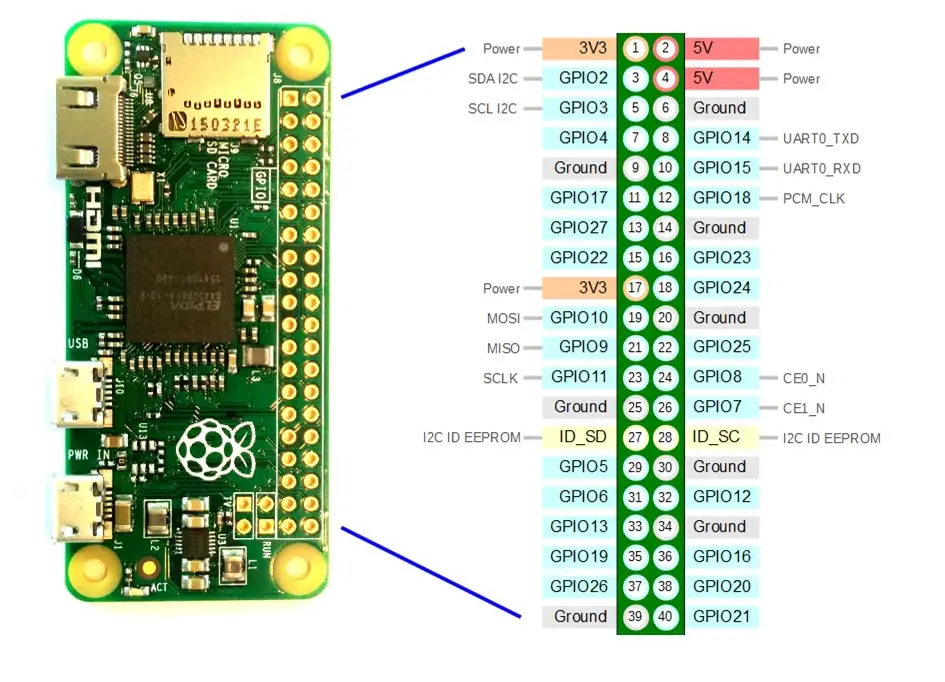
EDIT: I'm retrying, I think I got confused between the number pin it is on the board and the name (like GPIO 27, etc). Pictured here:
Edit again: That was the error. Thanks so much!!! Now its working!
Connection is also explained here https://forums.raspberrypi.com/viewtopi ... 4#p2285181 (as I'm using the same pinout for all displays).
Statistics: Posted by KovyJakes — Thu Apr 17, 2025 5:34 pm